I've spent a lot of time trying to find the best development method in Chrome OS. Recently I decided I wanted to create a chrome extension using Chrome OS. My first stop was CodeRun IDE which has a sample Chrome Extension project so I thought it would be great for a starter. The development is pretty mess free, but the problem comes once its downloaded. It comes downloaded and zipped. When loading an unpackaged Chrome Extension you can point Chrome to a directory, but not a zipped directory. So I had to unzip the files...which was pretty easy to do once I found wobzip.
Now that I had a skeleton Chrome Extension up and running, I could start to make it my own. I decided on a simple calculator for starters, plus I thought it might be useful. I have to admit it had been a while since I'd used the user 'chronos' in Developer mode, but once I got it there I found that Chrome OS had a new default text editor (thankfully) in 'vi'. This is where it got really fun. I edited my popup.html file to have a stylesheet and JavaScript file and loaded the html directly in Chrome. Enter the best web app ever... Chrome Dev Tools.
With Dev tools I am able to make changes to my stylesheets through the inspector to get the style just how I want, then save the modified .css file to the extension directory.
Similarly, I can edit and save versions of my JavaScript file directly from Dev tools. The only issue with this is when I overlooked some invalid code which prevented Chrome from loading the JavaScript file. This was not much of an issue the one time it happened to me, as I was able to enter vi and quickly rectify the rogue curly brace and was back to Dev Tools in no time. So If you ask me what my choice is for rapid JavaScript development, I'll say Chrome Dev Tools.
The result from blank files to:
and
Showing posts with label chrome os. Show all posts
Showing posts with label chrome os. Show all posts
07 July 2011

01 June 2011
Chromebook first dibs
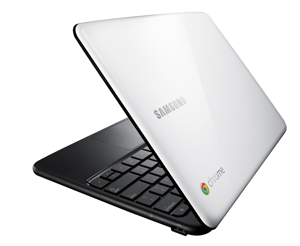
Being a test pilot has some perks. The latest of which is a special invitation to early released Chromebooks via the Gilt Groupe. Below is the email I received earlier today inviting me to Gilt's privileged offering of the newest Chromebook.


12 May 2011
Chromebooks!
Yesterday, at Day 2 of Google I/O, it was officially announced that Chromebooks will be available in retail locations worldwide starting June 15th. Perhaps even more exciting news was the mention that for Educational institutions (and businesses) these would be available at $20/month/user ($28/mo/user for business) which could be a huge savings (70% over traditional PCs according to the graphic here).
Here is the Keynote from Google I/O day two for those who missed it:
01 May 2011
Duostack: Cloud Platform as a Service
I have been using and trying many of the all-in-one solutions for web-based development on my Cr-48, but what happens when your favorite editor does not deploy directly to where you want your app to live (cloud9)? I tried this recently with a NodeJS app and a cloud platform (currently in beta) called Duostack. For my NodeJS app, just as everyone else toying with Node, I reinvented reworked the wheel and used Ryan Dahl's (creator of NodeJS) basic chat application. All I did was partition the client to act like it had multiple rooms rather than one group room as in the original. That is not what this post is about. This post is about how easy it is to get a node instance up and running on Duostack.
Duostack is a super easy to use cloud platform as a service for Node and Ruby apps. Databases that are available by default are MySQL, MongoDB, and Redis (the documentation states external DBs are welcome). The deployments live on the Amazon EC2 by default, but there is 'cross-cloud reliability' that will allow for fail over to the Proactive Cloud in case of a possible Amazon outage. Deployment is as simple as it could get with a cloud platform (well it could get simpler, but its super easy as you can read below).
To setup Duostack I had to move away from Chrome OS and into Ubuntu on my Cr-48. I followed the simple steps to get the command line interface installed. I used the curl method versus the node package manager install and had my Duostack instance configured shortly thereafter. So now to create a Duostack app. This is even easier then setup of the command line client, simply type 'duostack create <yourappnamehere>' and you have it. Duostack uses Git to control deployment so deploying is also a snap, just feed the command 'git push duostack master' from your git repository, wait a few seconds while Duostack works the deployment magic, and you have your Duostack application deployed. Mine lives here. So far I am more than pleased with my Duostack beta access and invite anyone with interest in deploying a Node or Ruby app to a cloud platform to signup and give it a try. I have a few other betas for platform as a service solutions to check out, but Duostack got first dibs by granting me beta access before the others.
26 April 2011
changing old habits
I have been doing a lot of development on my Cr-48 lately. And as I sit here coding away I wanted to note how useful chrome is to me as a developer. As I have written about previously there is a plethora of web-based IDEs to develop with in Chrome OS. So what I have been finding particularly useful regardless of the development environment is something any chrome user (I'm talking browser now, not OS) can utilize...the Chrome Developer Tools. Before I received my Cr-48, the majority of my browser based debug sessions lived in Firefox with the amazing and powerful tool Firebug, but thanks to Google I was forced to try something new. I thought nothing else compared to Firebug (I am not going to speak out against Firefox or Firebug as both are spectacular), but as I have familiarized myself with the Chrome tools I find they are just as powerful and robust. I love how easy it is to inspect an element on the page and edit CSS and JavaScript, check network events, record a timeline, or just drill through local variables in the console. So if you are like I was, before you move from chrome to some other tool just to step through your JavaScript in the console, stop and give the Chrome Developer Tools a try, you might decide to stay.
16 April 2011
Chrome OS Everyday
Writing code in the browser with Chrome OS is an important item for me as a developer and there are a growing number of apps available to get your geek on in the cloud, but what else is awesome on Chrome OS? Tons of things. I have been almost exclusively utilizing my Cr-48 since early February at home, with the exception of my taxes (chrome beta/dev wasn't supported), some photo management, the time when the developer build rendered the OS impossible to use (hooray for being a test pilot), and the occasional connection to my remote work computer. So it is promising that I am able to find a replacement for everything I do on a computer in Chrome OS with limited exceptions. What else?
I recently have been running some rigorous durability tests on my Cr-48, or I guess I should say Preschooler compatibility tests. I realized this was needed when I arrived at my son's daycare to see a dozen preschoolers huddled around a computer clicking things and learning their letters, numbers, and sequences. At home my son enjoys the stock windows Paint... a bunch. What could I use on the Cr-48? deviantArt muro is a cool choice although it took us a bit to get used to the track pad. Of course the Chrome web store has many options like Poppit, a balloon popping game which really tests the durability of the track pad. But one of my favorite apps is MeeGenius! Children's Books, which reads classic children's books out loud and highlights the words as it reads. Our favorite kid friendly site is and has been the PBS kids site which as an avid PBS kids family is full of friendly educational games from our most familiar characters.
For me, I have recently been utilizing my Cr-48 to read books on Google Books. It may not read super easy in direct sunlight, but I can read at night without a light. There are tons of books, "over 3 million", which is enough to keep any reader busy for a while. So there is plenty for everyone on Chrome OS, especially for everyday computer needs.
03 April 2011
Cloud9 revisited
A while ago I tried to use Cloud9 IDE to code in the cloud on my Cr-48 and it was too buggy to even try to accomplish anything in it. It now appears that the issues have been resolved. I have been interested in learning some of the awesome that is node.js. I could easily move to my Ubuntu partition, install and build node, and try it there. However, I really like Chrome OS and I've really been enjoying my other Google V8 JavaScript engine based development with Akshell so why not try Node.js in the cloud too. Cloud9 is the perfect place for this.
First let me say the the github integration with Cloud9 is super smooth. To start editing a github based project just enter the github url and click "start editing". So I created a new github repository and started a simple web server with node to see how it would go. I checked out one of Ryan Dahl's (the creator of node.js) introductory videos to get a simple server created in my server JavaScript file. Then I setup the server configuration in Cloud9 which only required me to tell it which JavaScript file to use and what command line arguments to send it (i.e. "node server.js") to get it running. Cloud9 does not let you specify a port number like one would in a desktop environment, but they add a helpful hint when running a server "Important: in your scripts, use 'process.env.C9_PORT' as port and '0.0.0.0' as host." So I modified the server file with the tip, clicked run and sure enough I created a node.js server.
I think using node.js on Cloud9 is up to par with any other web-based IDE. One thing it lacks versus something like Akshell or Kodingen is the ability to deploy to a subdomain directly. I can however build my app up (if I continue to use Cloud9 versus Akshell) and then deploy to a node.js hosting platform like duostack. For now I plan on using Cloud9 to learn some node.js and see what things I can make with that.
26 March 2011
A Better Web-Based IDE
After a few days this week without Chrome OS due to a fun error in the Dev build (though its never bad to be able to revert to Ubuntu), I am able to be a Cr-48 nerd again. The other day one of the three readers of this blog tipped me off on Akshell, another online development environment, which I quickly dove into in order to compare it against some of my other favorites which I have checked out previously here, here, and here. By far my favorite has been Kodingen, I still go to it to code around and generally geek it up. This all may change.
Akshell is a brilliant development environment that utilizes JavaScript for not only the client-side programming, but also the Server-side. There are many cool features to how apps are developed and integrated in Akshell, which can be found in their documentation here. I have found the environment to be amazing to use utilizing the default "ak" library and their Model-View-Controller framework. For my first test I tried to remake (and improve) the test site I created on Kodingen with Akshell. I found it was super fast to build with the Akshell environment and enabled me to test and preview just as smoothly as Kodingen though I think the interface with Akshell is much easier to navigate (perhaps because most of the features in Kodingen are still disabled in its current Beta state). I must admit that I did utilize jsFiddle to quickly enhance my HTML5 canvas that I had created in Kodingen and then simply copied the JavaScript to Akshell. So what does a quick Akshell site look like? See mine here.
One of the promising things about Akshell that I'll be getting into soon, is their relational database (PostgreSQL) that is accessible with their "Simple JavaScript API". From the documentation and the quick test I did with their relation variables I have to agree it is simple to use. I hope to get some time to get an app going that utilizes this database functionality soon.
I don't know if I like Akshell an better than Kodingen as far as functionality and features (they both let you code, use a database, and deploy directly within their apps) but I can say that Akshell seems to be a more elegant solution to the online coding environment so I will definitely be using it for my next online coding endeavor.
15 March 2011
A Beatbox in the Sky
Recently I've been trying to find less nerdy things to do on Chrome OS. I don't know if its because I've been boring myself when I analyze new cloud based development environments, or if its because I want to become a better advocate for Chrome OS and its purpose for everyone, but I started playing around with some cool applications.
I like music. I like thinking I am a musician (I know cover bands don't really count, but almost...). So when I saw in the Chrome Web Store a program from Aviary that would allow me to create music right in my fancy home in the cloud, I quickly installed it. The interface is super intuitive (i.e drag n drop or click a button), so I was off and running. There is about any sound you would need for a solid beat including drum kits, guitars, voices, even random sounds from around the house. My first beat tracks were based off of the standard acoustic drum kit, but I soon moved myself to using claps snaps and an 8 bit organ (<<have a listen if you must).
So Aviary is an amazing website that has loads of amazing artist tools, not just music creation. They have an audio editor where one can edit and mash together tracks, so the next step is to set up a drum track and try to play some music over the top of it in the music studio (or at least sample some of the creations that are out on Aviary's site). The other tools all seem to be likely candidates for common use for my everyday clouding needs like screen capture and image editing.
Update: Shortly after I posted the link to my sample sound Aviary's creation listening tool crashed. I checked a couple creations from other folks and those were broken as well. I'll update again when I see the link is working again.
Update: the link to the creation should work now.
02 March 2011
Coding in the Cloud: Part ?
"your Cloud9 beta account has been activated". I had been anxiously awaiting this email (although one can sign up now without a wait period) to continue my quest to find the best coding environment for use with my Chrome OS on my Cr-48. Cloud9 is another development-as-a-service platform that claims to be the go to solution to marry HTML5/JavaScript development with github and has received some decent reviews lately after its presentation at DEMO Spring 2011. So I had to login and get coding.
I followed the link provided and once signed in I was able to quickly create a new project. I added an html file and a JavaScript file to create a simple "hello world" website to test how the cloud9 development environment worked. I saved my work, then clicked "Preview" and my boring website was previewed in a new tab. Everything was working well until I returned to my project files and decided I wanted to rename them from untitled.html and untitled.js to test.html and test.js. Moments later as I was about the check out the "Run" and "Debug" options mysteriously the screen flashed and the files were once again named as the default "untitled". I saved the project to return later and investigate.
So I signed back in to my account and saw my previously saved project and selected "Open". This took me to the sign in screen only the styles were all gone and it was a bunch of blank screen with the login box. I of course had to try again, and after repeating this behavior a few times I thought, "maybe this is because its a beta account". So I created a new account and thought "at least I can get a test project started to my testing so I can do a good comparison of cloud9 with kodingen and coderun" but I was not able to create a project at all. I tried to use the shared github project that cloud9 provides as an example and that to failed.
Apparently cloud9 is getting hit hard with tons of new users who are experience some issues similar to mine, at least according to some of their twitter posts. I'll be anxious to get a real review of this cloud based development environment because in my brief time on the inside, it seemed very easy to use and elegantly constructed.
20 February 2011
Coding in the Cloud: Part II
Coding in the cloud is something I feel I need to be able to do easily now that I'm utilizing my Google Chrome OS notebook. Last post I discussed utilizing an online development environment called CodeRun and found it to be quite useful, but it is not my favorite cloud development environment. My favorite (so far) is called Kodingen.
Kodingen is "The Cloud Development Environment, Online Code Editor, Cloud Hosting, Web-based access to file system, Web-based ftp & svn integration" or at least it will be all of those things. Currently Kodingen is in Beta v3 so not all of those features are available as of this writing. Even though this cloud development environment is not fully operational it is still fantastic. As shown on their site, there is code support for php, perl, and python [with future support of django, ruby on rails, fastcgi,...]. The site you create is hosted on Kodingen, and they offer a default 500mb of diskspace, 1000mb of monthly traffic, 1 domain, 6 subdomains, and 5 databases by default (of course you can "get extra resources"). So I set out to play around with Kodingen.
Setting up an account was easy enough, so I logged in an got to work. I quickly created a website with an HTML5 canvas star field plastered on it all from the comfort of my Cr-48. As far as code editor selection, currently there is support for Bespin, CodeMirror, and Ymacs. I found that CodeMirror suits my needs best, though I might have been inclined to choose Bespin (probably because of its name), but it lacks good support for copy/paste in Google Chrome.
A couple features I have not utilized more than a simple evaluation are the database support and the image editing. Creating a MySQL database was a snap (PostgreSQL, and SqLite support to come) so I created a simple database with a couple tables that seemed to perform well enough. Image editing is currently supported using Pixlr (support for Aviary to come) and again seemed to perform well enough. Kodingen also reports future support for code repositories such as svn, git, and mercurial where one can create teams to manage joint coding efforts (can't wait to try it out).
So after my week of trialling CodeRun and Kodingen, I must lean toward Kodingen based mostly on personal preference, but I feel that both systems create a sound cloud based development environment. As I mentioned in the last post I think these systems would be ideal for educators wishing to introduce their students to web development or as a great code on the go environment.
14 February 2011
To The Cloud?
I want to maximize my time in the cloud, but as a Software Engineer, I currently spend a majority of my day developing web applications tethered to a desktop development environment loaded onto a workstation running a popular operating system developed in Redmond, WA. This is a fine environment when I am capable of getting to my cubicle at the office, but when a massive ice storm (as an example) prevents my journey to the office park, I must be able to work remotely.
There are many solutions to this problem, and most require some form of secure connection to my work network followed by a remote desktop session to control my machine at the office. Traditionally (before my chrome notebook) I had no reservations doing this as an adequate means to get my work done. On my Cr-48 my traditional methods of remotely connecting to my workstation are not possible, so I set out to find my new solution, a web-based remote desktop solution.
There are plenty of these remote desktop solutions to choose from. A popularized method in recent commercials stating "to the cloud" is not applicable here since it would require a cloud connection via "Internet Explorer 6 or later (32-bit version only)", which is probably not how I'll be connecting using my Google Chrome OS notebook. A couple of other web applications that will allow remote access that I have tested since getting my Cr-48 are LogMeIn and TeamViewer.
After trying out both of these I think I'll settle on TeamViewer if I need to connect remotely. This application is extremely user friendly and quick to set up. Download the installer onto your remote PC, get the connection information, log into the web access site and you are looking at your remote PC. Just as with other remote connections it seems to lag a bit but I was connected and able to navigate my applications remotely without much trouble. I did experience one minor issue where the character mappings from keyboard input were a bit off, i.e. '/' key became '§' but still nothing to prevent me from utilizing TeamViewer in a pinch.
After going through all of this I feel that my real goal should be to get all of my work including the code base to the cloud so no matter where I am, what computer I'm sitting behind, I can get to work. Thats what I plan to do next with some amazing new tools like Kodingen, CodeRun, and once I get my hands on the beta, Cloud9
10 February 2011
Home in the Cloud
Three days ago I received a marvelous gift from Google in the form of my very own CR-48 notebook. In December I had submitted my application to the Chrome OS pilot program, crossed my fingers, and a half dozen weeks later was lucky enough to receive my very own chrome notebook, and it is amazing.
I have been courting the cloud for some time, working in Google Docs, syncing photos to the web with Picasa, and loading a lightweight linux distro on an old HP laptop for nothing but netbook purposes, but now with the chrome notebook and Chrome OS I am going for a more committed relationship, attempting to detach myself completely (or as much as possible) from the standard operating system and live in the cloud.
This stealth notebook comes complete with a fledgling operating system (chrome os) that is proving to be powerful enough for all my everyday computing needs. The boot time is remarkable, with the removal of standard operating system boot bloat, Chrome OS is running in ~10 seconds. There are plenty of sites discussing the specifications of this device in detail, and I am not going to review the device here. Other reviews state this device and the Chrome OS are dead in the water, but so far I have to disagree. I can see a bright future for a fast, affordable, notebook with a lightweight operating system designed so that no matter what my location, I am able to connect to the cloud quickly and accomplish all the tasks I need to. I am going to push this device to it limit and see what, if any, limitations it has.
I have been courting the cloud for some time, working in Google Docs, syncing photos to the web with Picasa, and loading a lightweight linux distro on an old HP laptop for nothing but netbook purposes, but now with the chrome notebook and Chrome OS I am going for a more committed relationship, attempting to detach myself completely (or as much as possible) from the standard operating system and live in the cloud.
Subscribe to:
Posts (Atom)